Step 1 · Free
Estimate the leak
Size missed demand with your own numbers — useful for prioritizing, not proof yet.
Leakage Prevention System (LPS)
Two leaks: new patients who never find you on search and AI, and existing patients who quietly slip away — missed calls, no-shows, open slots, overdue recall. Xona is a Leakage Prevention System (LPS) that catches both, turns each into staff-ready actions, and proves every patient got booked.
Patients and AI assistants read these pages for hours, services and how to book. Claiming yours is free and is not a paid sign-up. The two leaks, explained
🍁 Built for Canadian dental clinics — ClearDent, Tracker, Oryx, Curve, CareCru, and RecallMax live today
Built to support busy teams, not blame them: prevent what can be caught early, recover what already slipped, and keep staff in control.
Where practices lose patients
patients asking,
right now
LEAK 1
never find you
your
practice
LEAK 2
never come back
patients
who stay
Xona keeps a public page for dental practices across Canada. It is built from each practice's Google profile and, where it has one, its own website. Every fact shows the date it was read.
Find my practiceClaiming and connecting are free. Xona LPS is the paid part: calls answered, recall worked, and every outcome reported back to you.
Schedule leakage map
Not a front-desk blame chart — these are the moments every busy clinic has. Tap one to see how Xona catches it.
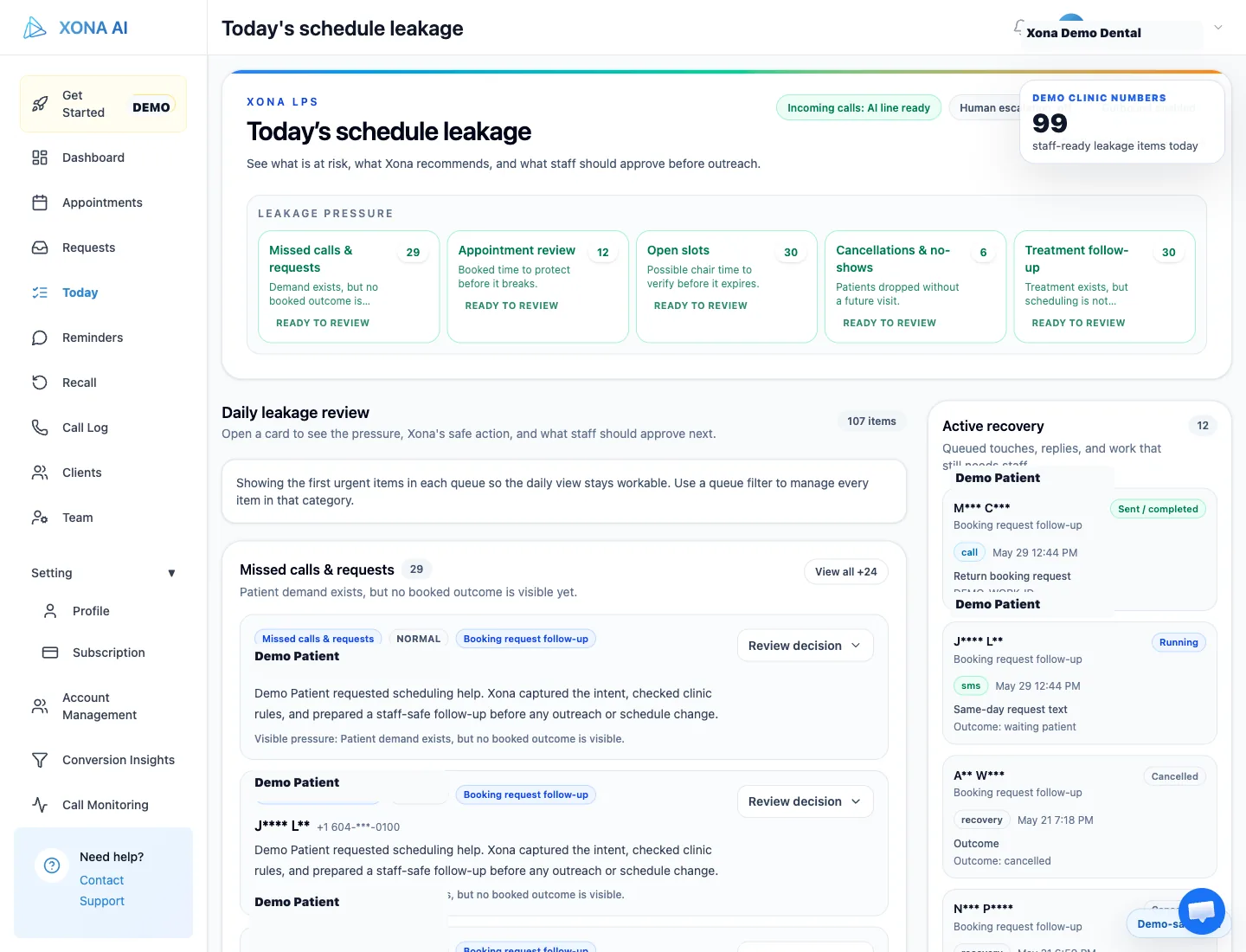
Real product · Today queue
How you start
No commitment until the numbers say so: size the leak with a free estimate, review real clinic signals without touching patients, then run one approved workflow and measure what it recovered.
Step 1 · Free
Estimate the leak
Size missed demand with your own numbers — useful for prioritizing, not proof yet.
Step 2 · Safe
Review real signals
We review calls, schedule risk, and recall against your real clinic signals. No patient contact, no schedule changes, no software writes in the first review.
Step 3 · Proven
Run one approved workflow
Staff approves the rules and messages. Xona runs it and reports what was booked, saved, needs staff, or is still leaking — measured, not promised.
Real screens, not mockups
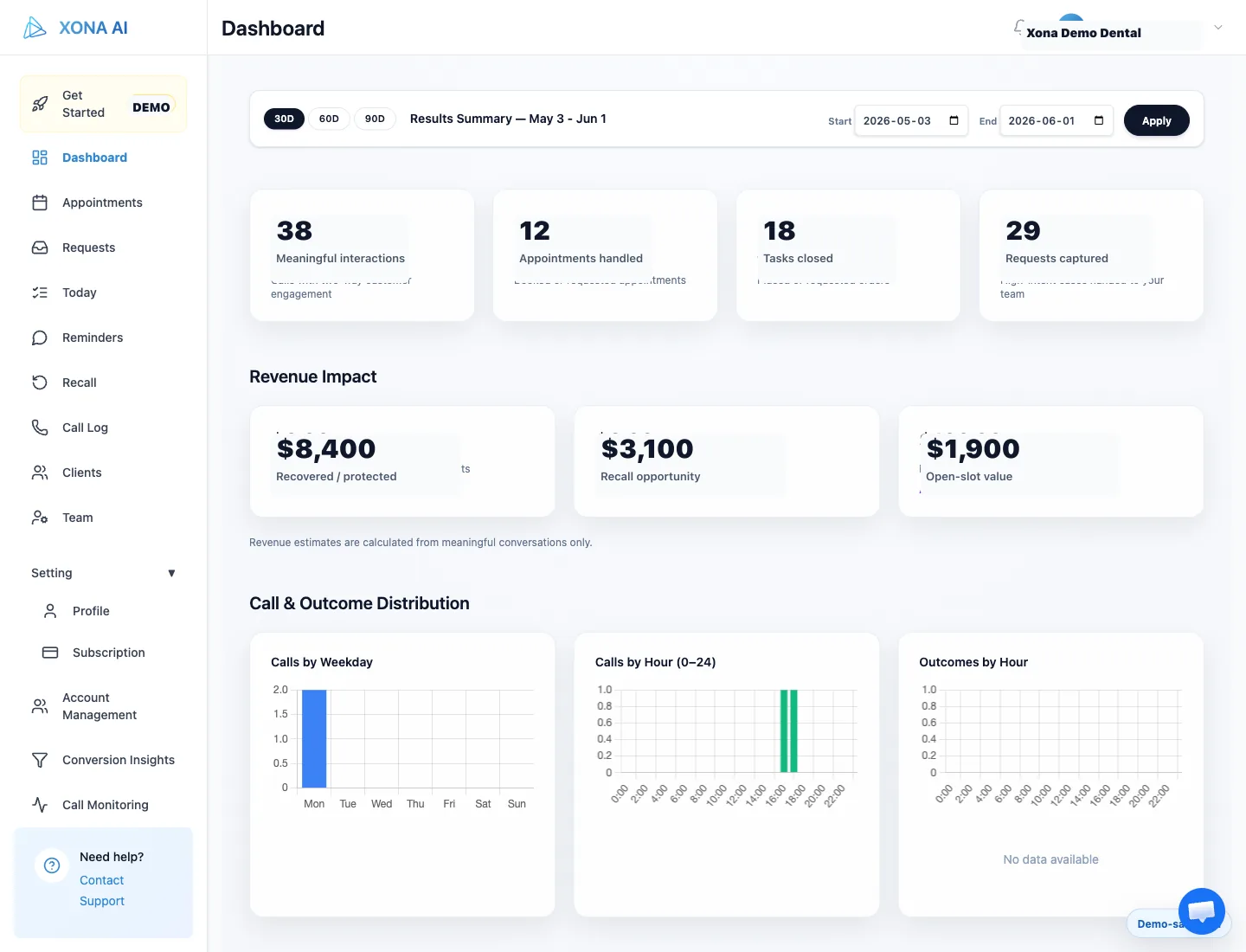
Captured from the live product with patient details masked. The owner view shows outcomes and recovered value; the staff Today queue turns every caught leak into a reviewable next action — not another inbox to babysit.
Product slides · dashboard + today
Owner view
Outcomes, recovered value, and remaining leakage.
Staff view
Today’s todos: calls, gaps, cancellations, and follow-ups.
Outcome
Dashboard
Action
Today queue
Hidden money story
Your dental software may contain hundreds or thousands of overdue patients. A recall preview turns that silent backlog into a reachable list and a conservative recovery estimate.
Anonymized ClearDent preview
patients past recall date
with a working phone number
conservative year-one recovery opportunity from one clinic’s own data
From one anonymized ClearDent clinic preview. See how this number was built →
Customer evidence
Dr. Hagi runs Oryx; Dr. Sajan runs ClearDent. Both recorded these themselves. Every number beside them is measured from their own Xona deployment — not sampled, not rounded.
“Voicemails are down dramatically. No double entry, no dropped balls.”
Dr. Dan Hagi
Owner · DH Smile Center Dentistry
Thornhill, Ontario
Xonark data · measured 13 July 2026
“The platform is easy to use, very intuitive — it really seems like they care and they want the practice to succeed.”
Dr. Amarjot S. Sajan
Owner · Teeth and Company by Dr. Sajan
Victoria, British Columbia
Xonark data · measured 13 July 2026
handled in a 60-day sampled deployment
from after-hours calls in that sample
captured instead of lost to voicemail
conservative year-one estimate from that practice
Blog proof
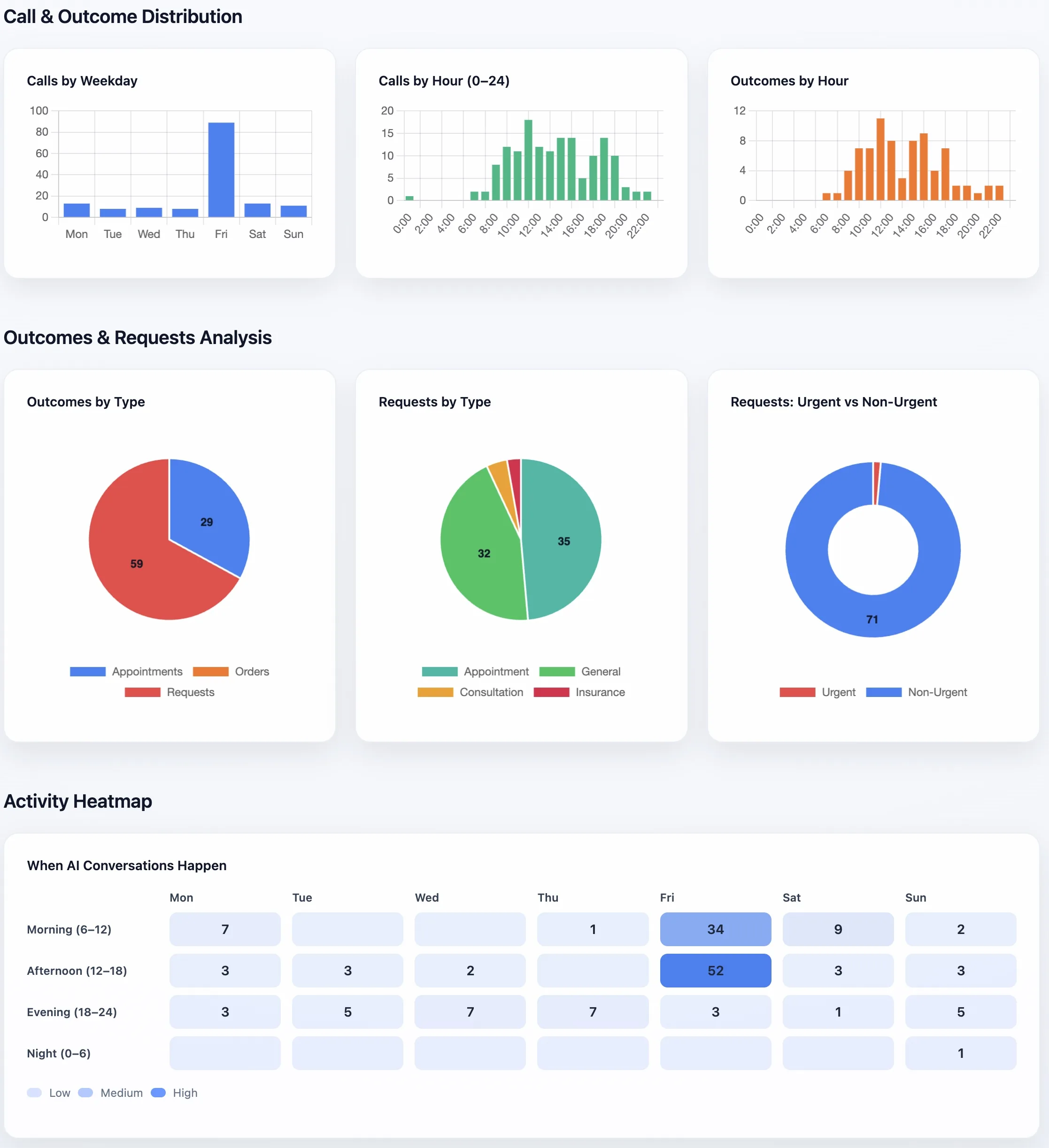
157 after-hours calls
See what the line actually handled in a 60-day Oryx sample.
Read case study →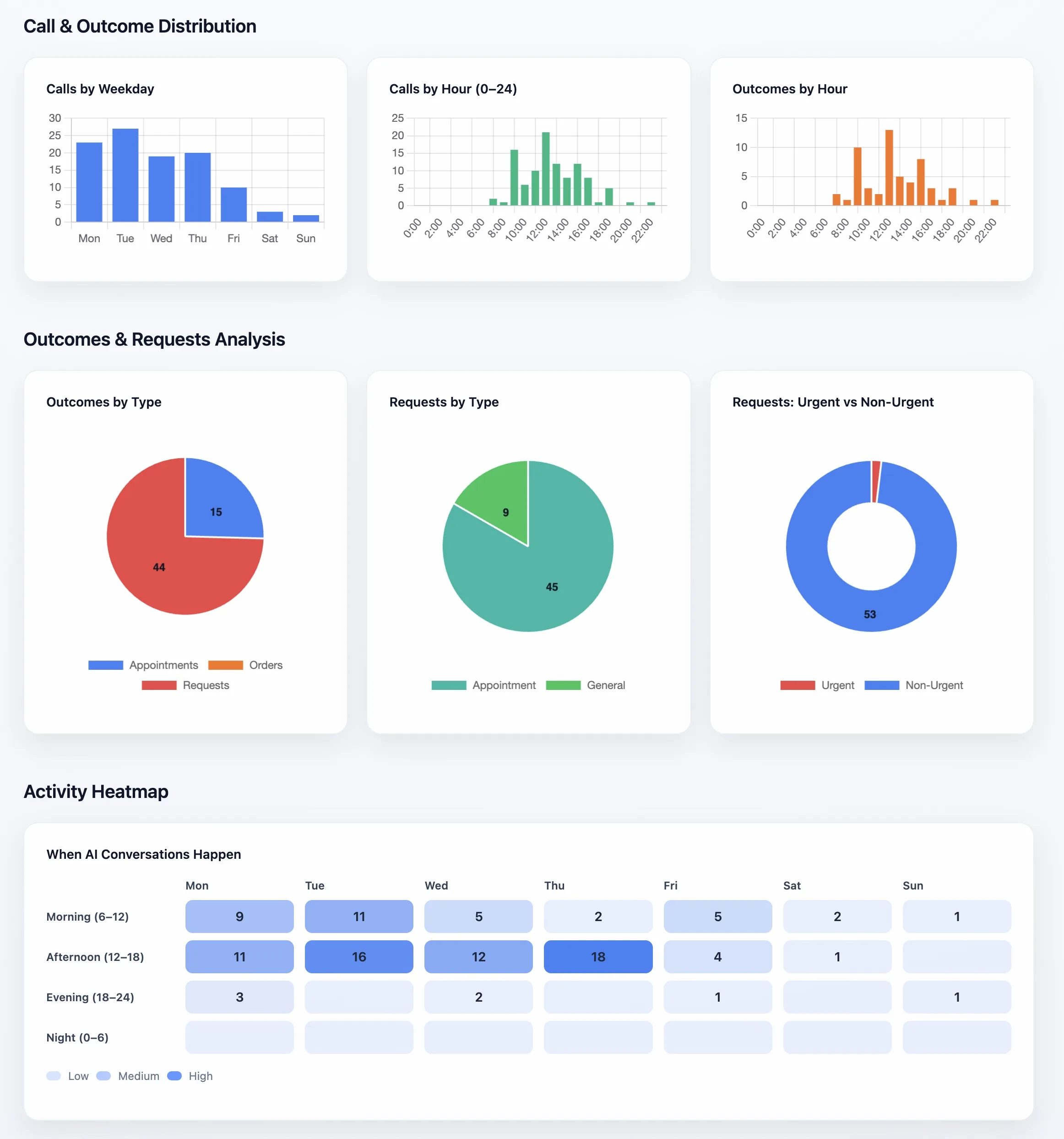
Blog proof
Busy-hour overflow
See how in-hours and after-hours demand split in a 24/7 clinic.
Read case study →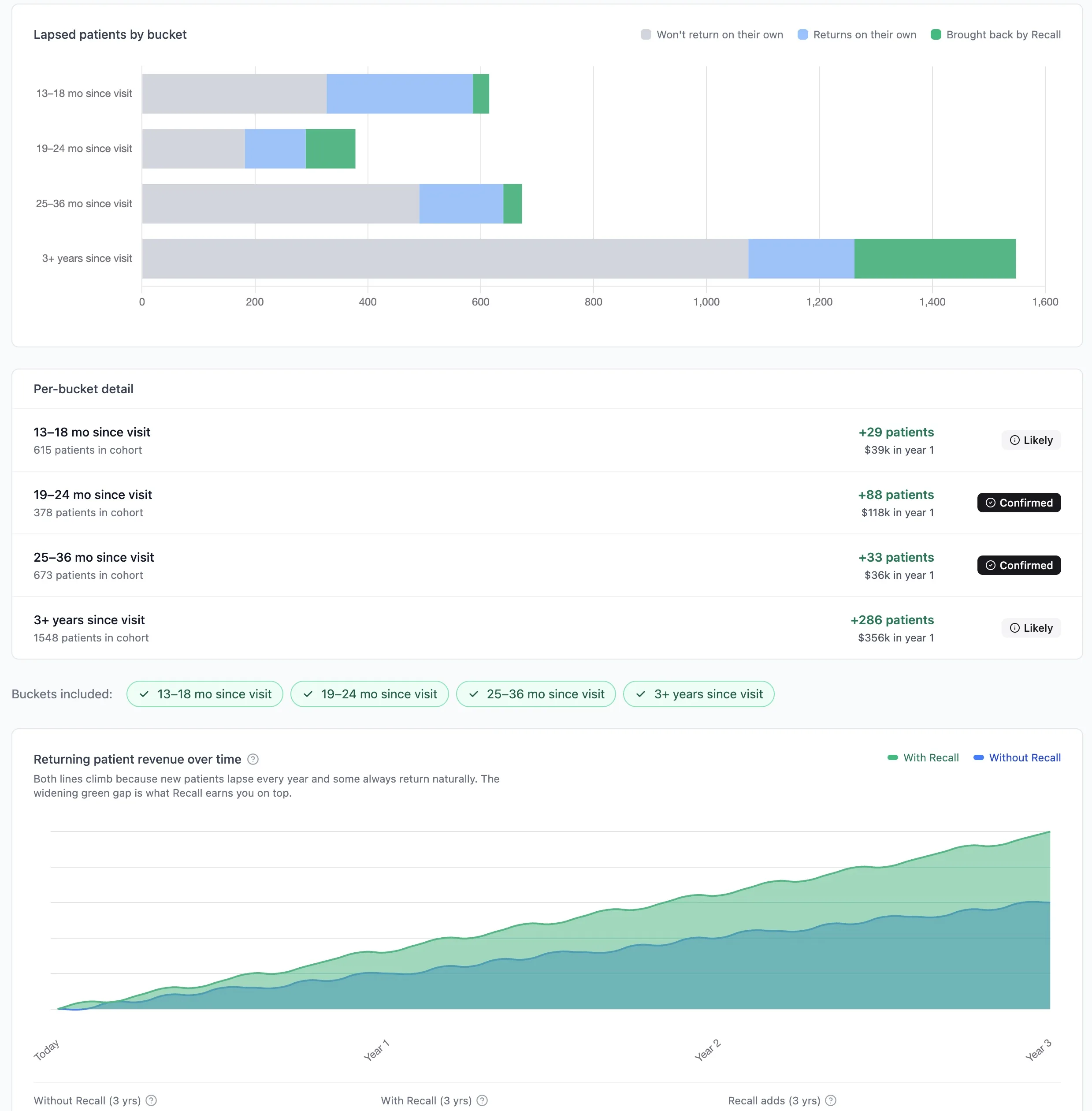
Blog proof
$172k recall preview
See how hidden dental software data became a conservative recovery estimate.
Read case study →Vancouver / Lower Mainland clinic
Cleaner staff handoff
Staff could see what the patient wanted and what needed review, instead of digging through voicemail.
Office manager feedback
Victoria clinic
After-hours visibility
Calls stopped feeling like a black box: bookable requests, callbacks, and urgent issues were easier to separate.
Practice lead feedback
Toronto clinic
Overflow without losing control
The team stayed in control of clinic rules while fewer patient requests waited until the next business day.
Operations feedback
Named practices above appear with their consent, and their figures are exact counts from their own deployment, measured to 13 July 2026. The case studies and clinic signals below are reported differently: they stay anonymized until those customers approve a public reference, and their metrics are sampled, rounded where needed for privacy, and workflow-dependent. Results vary by clinic configuration, call volume, dental software, and staff rules.
Watch and hear Xona
Each demo pairs the call with the staff note it produced: patient intent, priority, what Xona did, and the next action — a clean handoff, not another inbox to babysit.
Call sample
Appointment booking
Patient asks for an appointment. Xona confirms the reason for visit, gathers the scheduling details the clinic requires, and follows the approved booking path.
Staff note example
Booked / confirmPatient requested an appointment and accepted an approved booking path. Details were captured for staff review.
Next action: Confirm provider/operatory fit and review the appointment note before the visit.
Call sample
Existing patient reschedule
Existing patient explains they cannot keep the original time. Xona captures the requested change, confirms the patient details, and routes anything outside clinic rules for review.
Staff note example
Reschedule reviewExisting patient requested a new time. Xona captured the request and followed the approved reschedule path.
Next action: Review available options, confirm the moved appointment, or call patient if the request falls outside rules.
Call sample
Cancellation request
Patient says they may need to cancel. Xona captures timing and reason, avoids clinical or policy promises, and creates a high-priority slot-risk note.
Staff note example
Slot at riskPatient indicated they may cancel. Xona captured reason and timing instead of silently losing the slot.
Next action: Confirm cancellation policy, offer reschedule if appropriate, and fill the opening from waitlist/recall.
Schedule safety
Where approved, Xona can write appointments into your dental software schedule — not just send another callback task. It still follows configured scheduling rules, appointment types, provider availability, handoff preferences, and escalation paths.
Integrations
ClearDent, Tracker, Oryx, and Curve are live today, and Xona connects directly to CareCru and RecallMax online booking. Dentrix and Open Dental are not live yet. Other practice systems start with a free review so we can confirm the safest workflow before go-live.

ClearDent
Live today
Schedule lookup, patient context, recall preview, and approved appointment writes into the dental software schedule for configured clinics.
Running it today
Dr. Amarjot S. Sajan
Teeth and Company by Dr. Sajan · Victoria, British Columbia
742 calls answered · 9 months live
Hear Dr. Sajan →
Tracker
Live today
Patient lookup, appointment workflows, slot-risk review, and staff-visible handoffs.
This slot is open
Running Xona on Tracker?
We publish exact counts from real deployments — no rounding, no anonymized guesses. Yours could be the one shown here.
Ask to be featured →
Oryx
Live today
Cloud appointment workflows, direct booking where approved, and after-hours support.
Running it today
Dr. Dan Hagi
DH Smile Center Dentistry · Thornhill, Ontario
922 calls answered · 11 months live
Hear Dr. Hagi →
Curve
Live today
Cloud connection with nothing to install. Patients, schedule, openings, and your Curve recare list sync; Xona books, reschedules, confirms, and cancels on approved workflows.
This slot is open
Running Xona on Curve?
We publish exact counts from real deployments — no rounding, no anonymized guesses. Yours could be the one shown here.
Ask to be featured →In progress
Dentrix
Not live yet. If you run Dentrix, we review the workflow free and confirm the supported read/write scope before any build.
Open Dental
Not live yet. If you run Open Dental, we review the appointment, patient, and recall workflows free before any build.
Free integration review
If your dental software is not listed as live today, we review it free and confirm the safest path before you commit.
Practical questions
The short answer: start with a review, keep clinic rules in control, and only connect software when the patient-facing workflow is approved.
No. The first review can start with your goals, call patterns, recall question, or current patient path. Dental software connection is only discussed if a patient-facing workflow makes sense and your clinic approves the path.
Where the workflow is approved and configured, Xona can write appointments into the schedule. If the request is unclear, outside rules, or not approved for direct write, it becomes a clean staff task instead.
It should not improvise. Unclear requests, clinical questions, emergencies, unusual appointment types, or policy-sensitive cases route to staff using the clinic rules approved before go-live.
Yes. Setup starts with clinic-approved rules: appointment types, provider availability, escalation paths, call routing, and handoff preferences. Staff can review and adjust before anything expands.
Xona does not diagnose or give clinical advice. Pain, emergency, and unclear clinical requests follow your clinic escalation policy so the right person is notified.
The team gets the patient intent, what Xona did, priority, summary, and next action. The goal is a useful staff note or approved booking path, not another dashboard to babysit.
Clear pricing for the workflow you choose
Public packages start at $449/mo with annual billing. The review helps confirm whether call recovery, schedule protection, open-slot refill, recall, or the full Leakage Prevention System is the right first step.