Xona LPS · the second leak

The Leakage Prevention System for the patients you already have.

LPS watches the five places a schedule leaks — missed and overflow calls, after-hours demand, unconfirmed appointments, open chair time, and recall backlog — turns each into a staff-approved action, and reports exactly what was booked, saved, or still needs review. Packages from $449/mo.

Everything below is captured from the live product with patient details masked — the demo shows the same screens on your clinic's numbers.

Product tour

The product is the pitch.

These are captures of the real product, not marketing mockups: find what is leaking, decide what is safe, then track whether each item was booked, saved, reviewed, or still at risk.

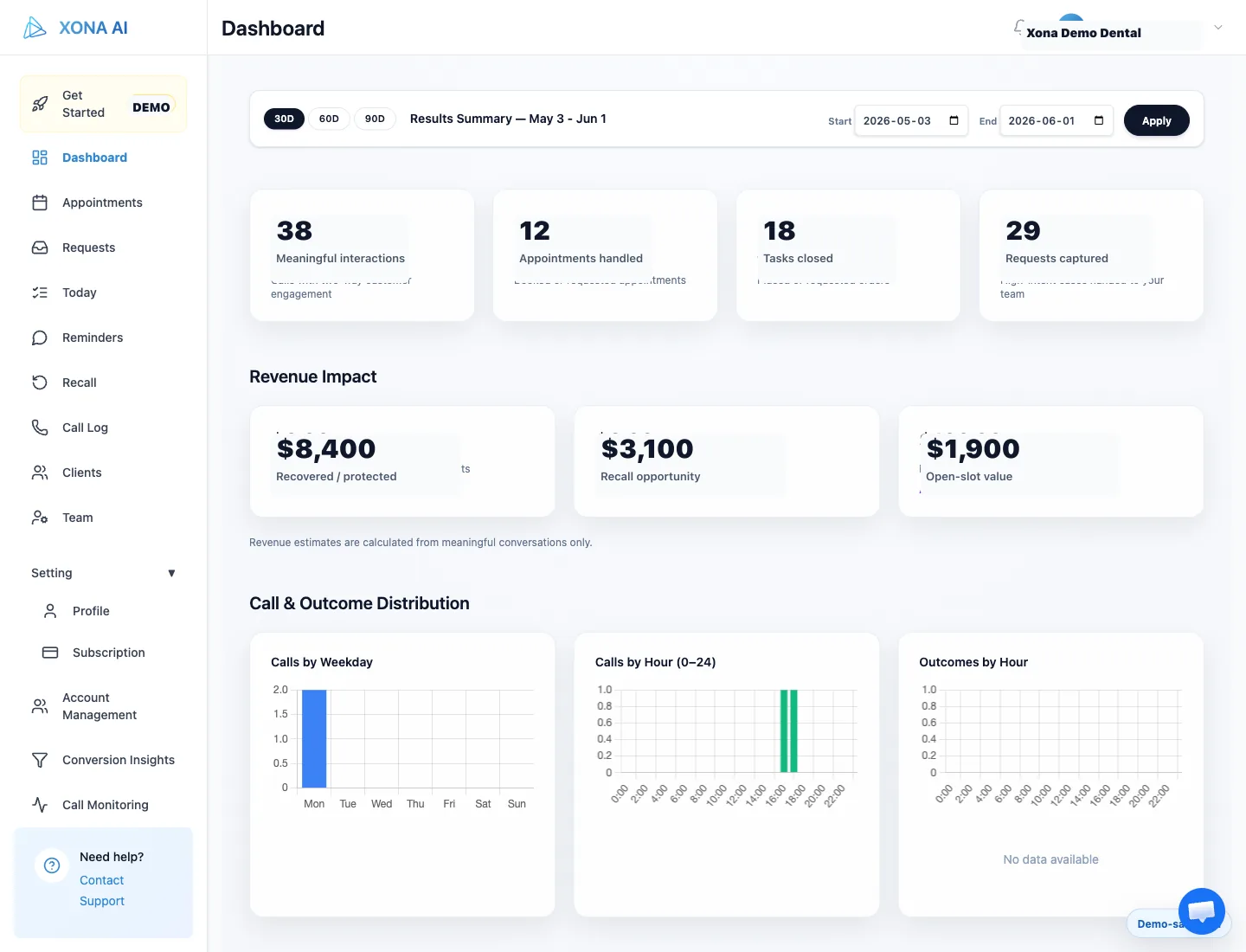
Xona dashboard showing outcome summary, recovered value, appointment handling, and call distribution

Outcome view

What was booked, saved, and still leaking

Owner dashboard
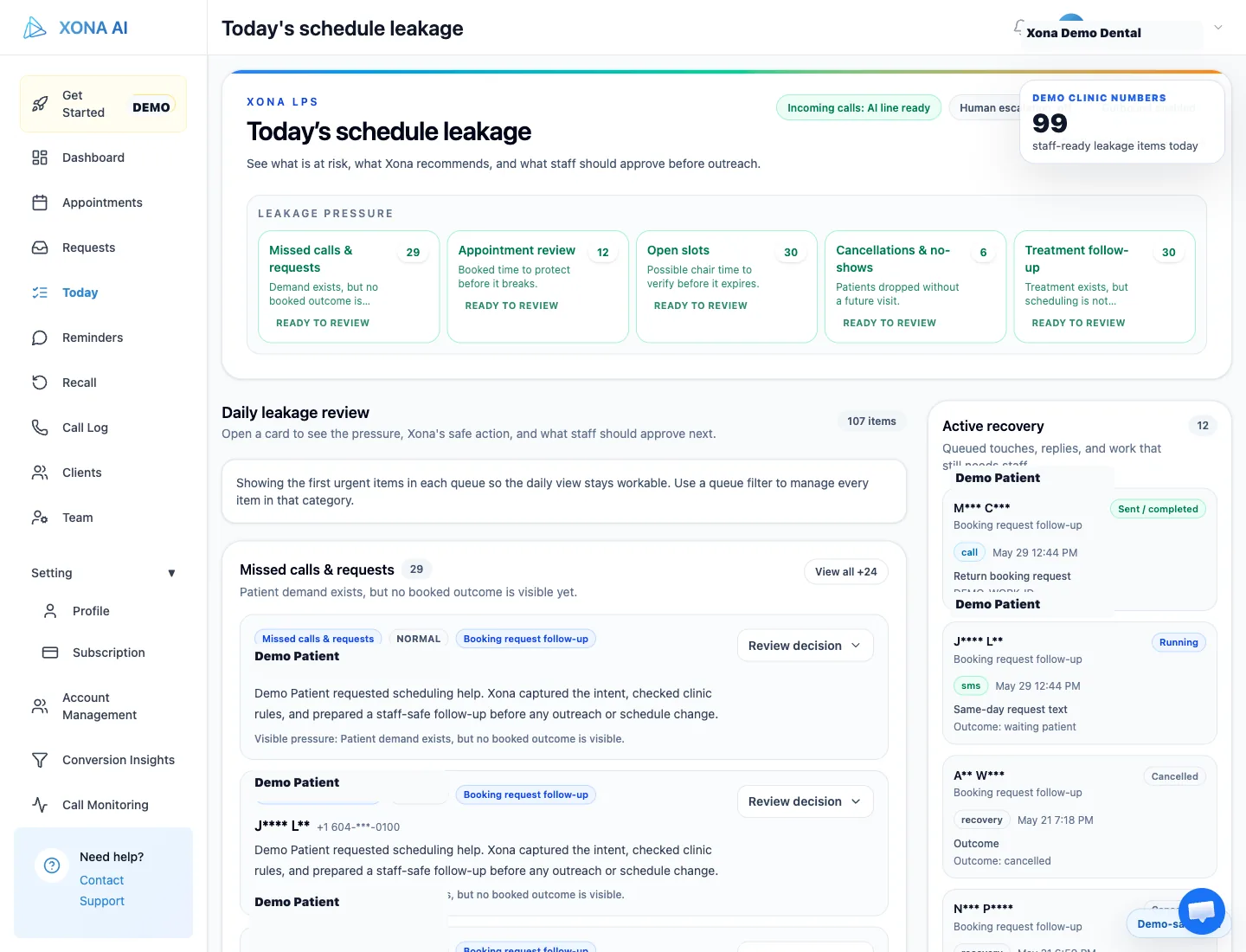
Xona Today queue showing staff-ready leakage work streams, review items, and outreach queue

Daily work queue

What staff should review next

Today queue
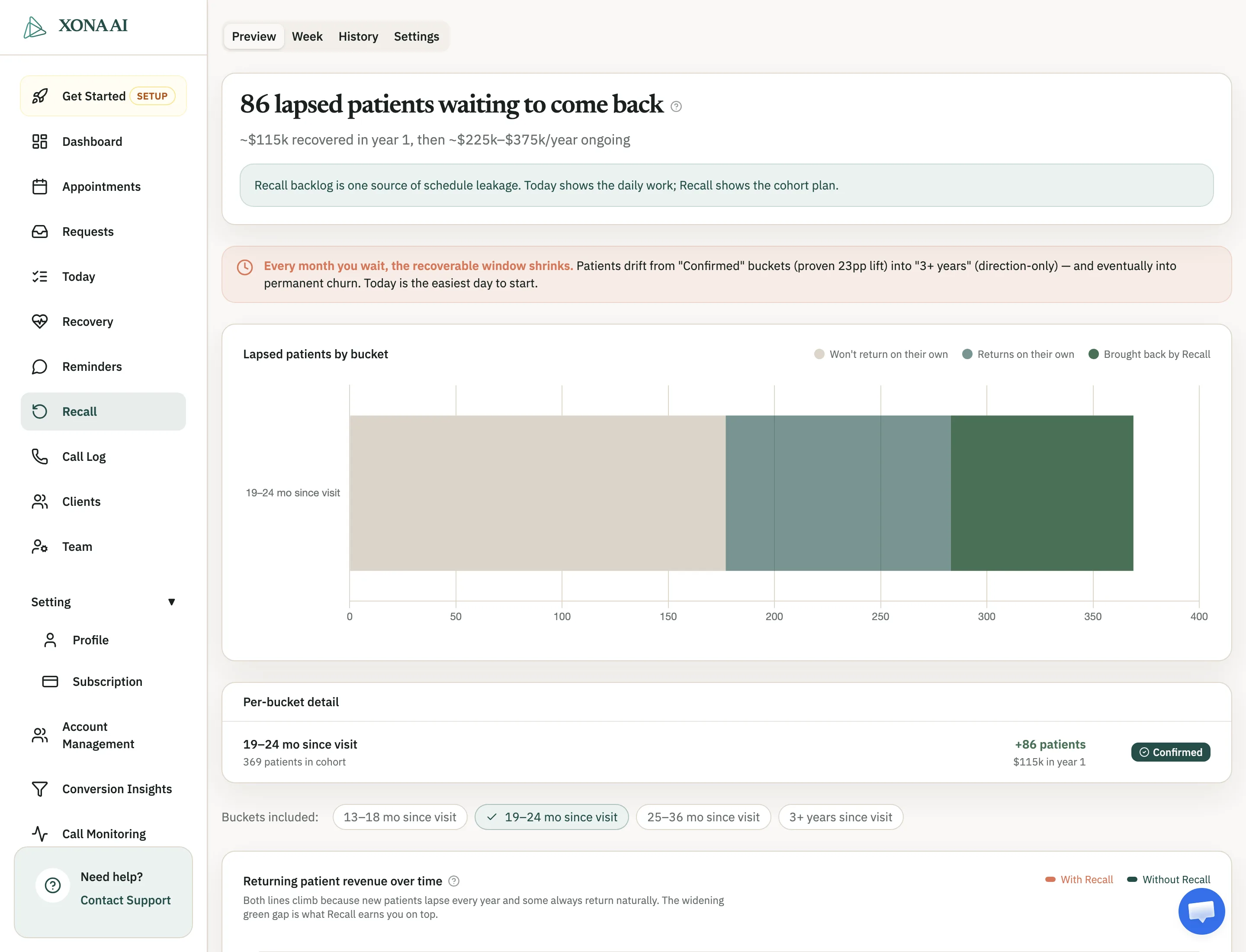
Xona Recall dashboard showing lapsed patients by bucket and estimated recovery opportunity

Recovery list

Which overdue patients are reachable first

Recall
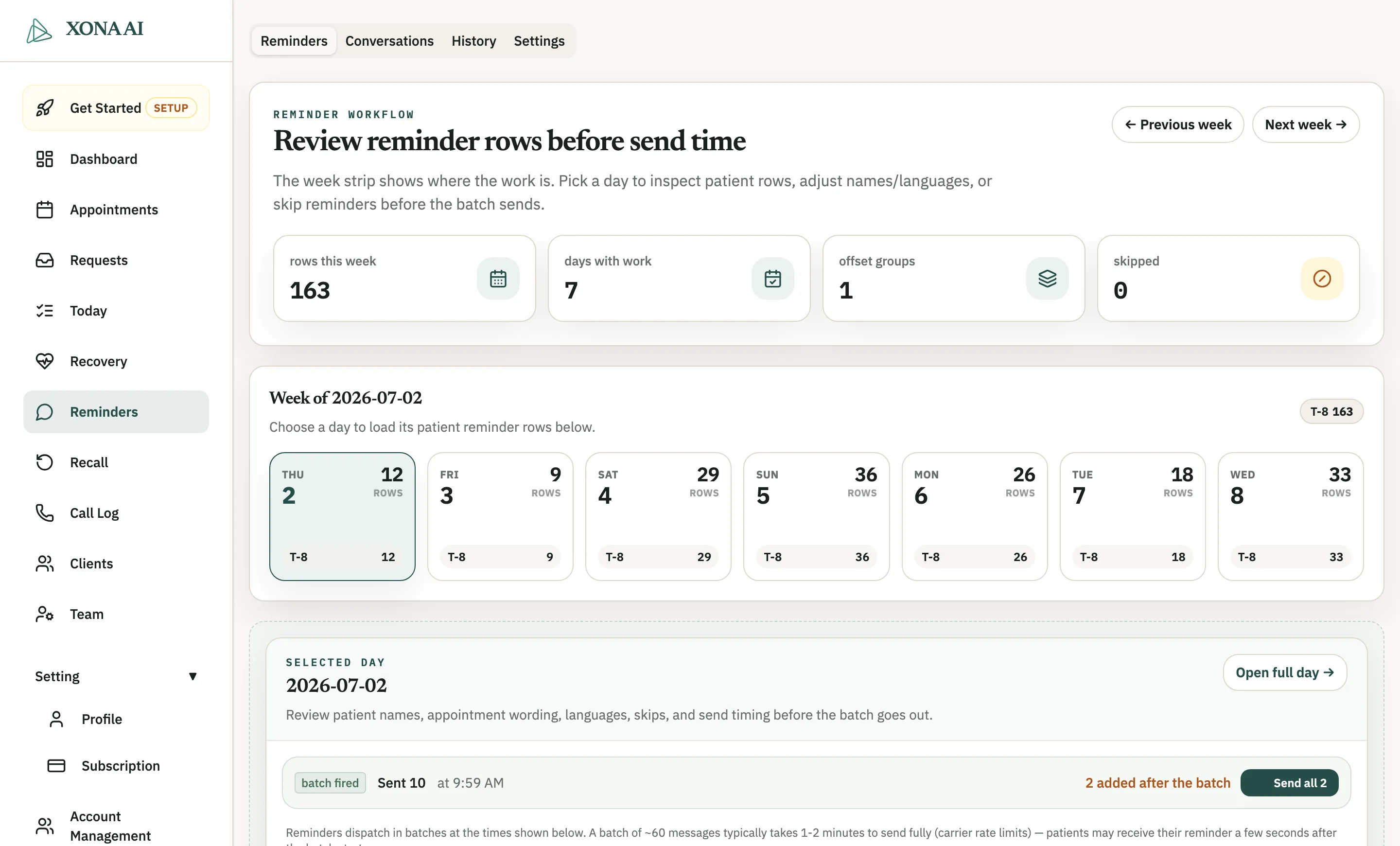
Xona Reminders workflow showing the week strip of reminder rows and per-day review before batches send

Review before send

Every reminder batch is reviewable before it sends

Reminders
Xona Today queue showing work streams and staff review items

01 · Today queue

Staff reviews today’s leakage before it spreads.

Calls, booking requests, appointment risk, cancellations, open slots, and treatment follow-ups appear as one staff-ready queue. The team can review, snooze, clear, or approve the next outreach step.

Owner: Owner sees where demand is leaking.

Front desk: Front desk gets a prioritized queue instead of voicemail digging.

Xona reminder settings showing send windows, staff review rules, and template controls

02 · Reminder rules

Reminder rules are configured before patient confirmations go out.

Send windows, language settings, template copy, and staff review rules make reminder work visible. Patient replies can become review work instead of hidden schedule risk.

Owner: Owner sees appointment-risk coverage.

Front desk: Front desk sees which rules are active, editable, and ready for review.

Xona recall preview showing lapsed patient buckets and recovery opportunity

03 · Recall and open slots

Backlog and open time become approved recovery work.

Xona groups recall opportunity, shows likely value, and uses outbound rules for safe refill or recall outreach after staff approval.

Owner: Owner sees reachable recovery value.

Front desk: Front desk gets a short list instead of a giant overdue report.

Xona Reminders workflow showing per-day review of reminder rows before batches send

04 · Rules and boundaries

Clinic rules stay visible before anything expands.

Every outbound batch is reviewable before it sends — patient rows, wording, languages, and skips stay staff-controlled before live patient handling expands.

Owner: Owner sees control, not blind automation.

Front desk: Front desk sees what Xona will say and when staff must review.

Patient-side moments

What the patient sees is simple. What staff sees is controlled.

These are synthetic phone mockups, not real patient messages. They show the missing half of the workflow: a reminder confirmation, an open-slot offer, and recall interest turning into a staff-visible next step.

Live patient outreach still follows clinic-approved templates, SMS windows, consent rules, and staff approval levels.

Xona Dental

Messages

Hi Mina, this is Xona Demo Dental. Please reply C to confirm your hygiene visit tomorrow at 10:00 AM.

C

Thanks — you are confirmed. Reply HELP if you need the office.

Reminder confirmation

Confirmed

Turns reminder replies into visible schedule protection.

Staff note: Appointment marked confirmed. No callback needed.

Xona Dental

Messages

Hi Jason, we have an opening this Thursday at 2:30 PM for your hygiene visit. Would you like us to hold it?

Yes please

Great — the office will confirm the booking details shortly.

Open-slot refill

Booked

Turns empty-chair time into approved outreach, not a phone scramble.

Staff note: Patient accepted refill offer. Staff reviews provider, length, and write-back rule.

Xona Dental

Messages

Hi Ava, you are due for your hygiene visit. We can help find a time that works.

Do you have next week morning?

Yes — I can prepare options for staff review before anything is finalized.

Recall booking

Ready to review

Turns backlog into a prioritized patient conversation.

Staff note: Recall patient is interested. Next step: approve available slots or call back.

Xona LPS walkthrough

See how schedule leakage becomes staff-ready work.

DAC-built product captures show the daily queue, recall preview, reminders, and outreach settings — so owners can see where leakage is happening and staff can see the next safe action.

Xona dashboard showing outcome summary, recovered value, appointment handling, and call distribution

Outcome view

What was booked, saved, and still leaking

Owner dashboard
Xona Today queue showing staff-ready leakage work streams, review items, and outreach queue

Daily work queue

What staff should review next

Today queue
Xona Recall dashboard showing lapsed patients by bucket and estimated recovery opportunity

Recovery list

Which overdue patients are reachable first

Recall
Xona Reminders workflow showing the week strip of reminder rows and per-day review before batches send

Review before send

Every reminder batch is reviewable before it sends

Reminders

DAC means Demo-Aligned Commerce: real workflows become the website demo, sales proof, and feedback loop. Patient names, phones, and private clinic details are masked.

Xona Today workspace with workstreams, work queue, and outreach queue using masked demo-safe patient data

Today

One daily queue instead of five scattered inboxes

Calls, follow-ups, appointment risk, cancellations, open slots, and outreach results appear in one staff-controlled workspace.

Xona Recall dashboard showing lapsed patients by bucket and estimated recovery opportunity

Recall

Recall backlog becomes a reachable list

Owners can see overdue-patient buckets, likely recovery value, and which groups are safest to contact first.

Xona Reminders workflow showing the week strip of reminder rows and per-day review before batches send

Reminders

Reminder batches are reviewable before they send

The week strip shows where the work is; staff can inspect patient rows, adjust wording and languages, or skip reminders before each batch goes out.

Xona owner dashboard showing interactions, appointments handled, revenue impact, and call distribution charts

Owner dashboard

Outcomes stay visible — booked, saved, still leaking

Meaningful interactions, appointments handled, revenue impact, and call distribution in one owner view, so automation never becomes a black box.

Calls and handoffs

Hear the patient-facing part before your team approves it.

These calls show how Xona follows rules, captures intent, and produces a staff note. The live pilot still starts only after clinic rules and workflow boundaries are approved.

Call sample

Appointment booking

1:03
Patient wanted
Patient wants to book an appointment and confirm the next available time.
Xona did
Xona checks clinic workflow rules, collects the right details, and books where configured or captures a clean follow-up.
Staff result
Booking intent reaches the schedule instead of voicemail or a missed callback.
Transcript summary

Patient asks for an appointment. Xona confirms the reason for visit, gathers the scheduling details the clinic requires, and follows the approved booking path.

Staff note example

Booked / confirm
Priority: Normal

Patient requested an appointment and accepted an approved booking path. Details were captured for staff review.

Next action: Confirm provider/operatory fit and review the appointment note before the visit.

Call sample

Existing patient reschedule

1:28
Patient wanted
Patient needs to move an existing appointment to a different time.
Xona did
Xona identifies the reschedule request, checks allowed options, and avoids risky changes outside clinic rules.
Staff result
Routine scheduling pressure is reduced while staff keeps control of exceptions.
Transcript summary

Existing patient explains they cannot keep the original time. Xona captures the requested change, confirms the patient details, and routes anything outside clinic rules for review.

Staff note example

Reschedule review
Priority: Review

Existing patient requested a new time. Xona captured the request and followed the approved reschedule path.

Next action: Review available options, confirm the moved appointment, or call patient if the request falls outside rules.

Call sample

Cancellation request

0:36
Patient wanted
Patient wants to cancel or cannot keep an upcoming appointment.
Xona did
Xona captures the cancellation reason, checks escalation rules, and routes unresolved schedule risk to staff.
Staff result
The team gets a clear task early enough to protect the opening where possible.
Transcript summary

Patient says they may need to cancel. Xona captures timing and reason, avoids clinical or policy promises, and creates a high-priority slot-risk note.

Staff note example

Slot at risk
Priority: High

Patient indicated they may cancel. Xona captured reason and timing instead of silently losing the slot.

Next action: Confirm cancellation policy, offer reschedule if appropriate, and fill the opening from waitlist/recall.

Staff safety rules

What Xona will not do without clinic approval.

The system should feel useful to staff, not risky. Xona starts from approved rules and review paths, not unsupervised automation.

✓ No clinical advice or diagnosis
✓ No treatment-cost promises
✓ No booking outside approved appointment types
✓ Emergency and pain calls route by clinic policy
✓ Unclear requests become staff review tasks
✓ Staff approves workflows before go-live

Additional walkthroughs

Short explainer videos for call routing and setup.

Use these as background after reviewing the real workflow tour above.

How Xona Handles Calls

1:26

See how Xona answers calls, follows rules, and hands off to staff.

What is Xona

1:11

A quick overview of what Xona does for dental teams.

Set Up Call Routing

3:46

Walk through call forwarding and routing setup for a pilot.

Pilot path

How a safe LPS pilot starts.

A low-risk pilot starts narrow: estimate the leak, review real clinic signals, approve rules, then run one workflow before expanding.

  1. 01 Estimate the leakage area
  2. 02 Run a safe review of real signals
  3. 03 Approve clinic rules and boundaries
  4. 04 Configure routing or dental software path only where needed
  5. 05 Start one measurable workflow

Request an LPS demo

See these workflows on your clinic's numbers.

Tell us where it hurts — missed calls, recall, cancellations — and we'll reply the same business day with a short call time and what we'd review first. No patient contact, no software writes before you approve anything.

  • A walkthrough of the exact screens above, on your workflow
  • A conservative recovery estimate for your leak, not a generic pitch
  • The pilot path and pricing for the one workflow that fits first

Prefer to size it yourself first? Run the free leakage estimate and bring the number to the call.

* Required fields. We use the submitted source fields only to understand which page, post, or comment created the request.

First reply path: we identify the likely leak, explain what data is needed next, and recommend the smallest safe workflow. We do not contact patients, change schedules, or write to your dental software during the first review.